Minecraft 26.4 Snapshot 2: F3 Debug Screen Redesign, Fog & Sky Fixes
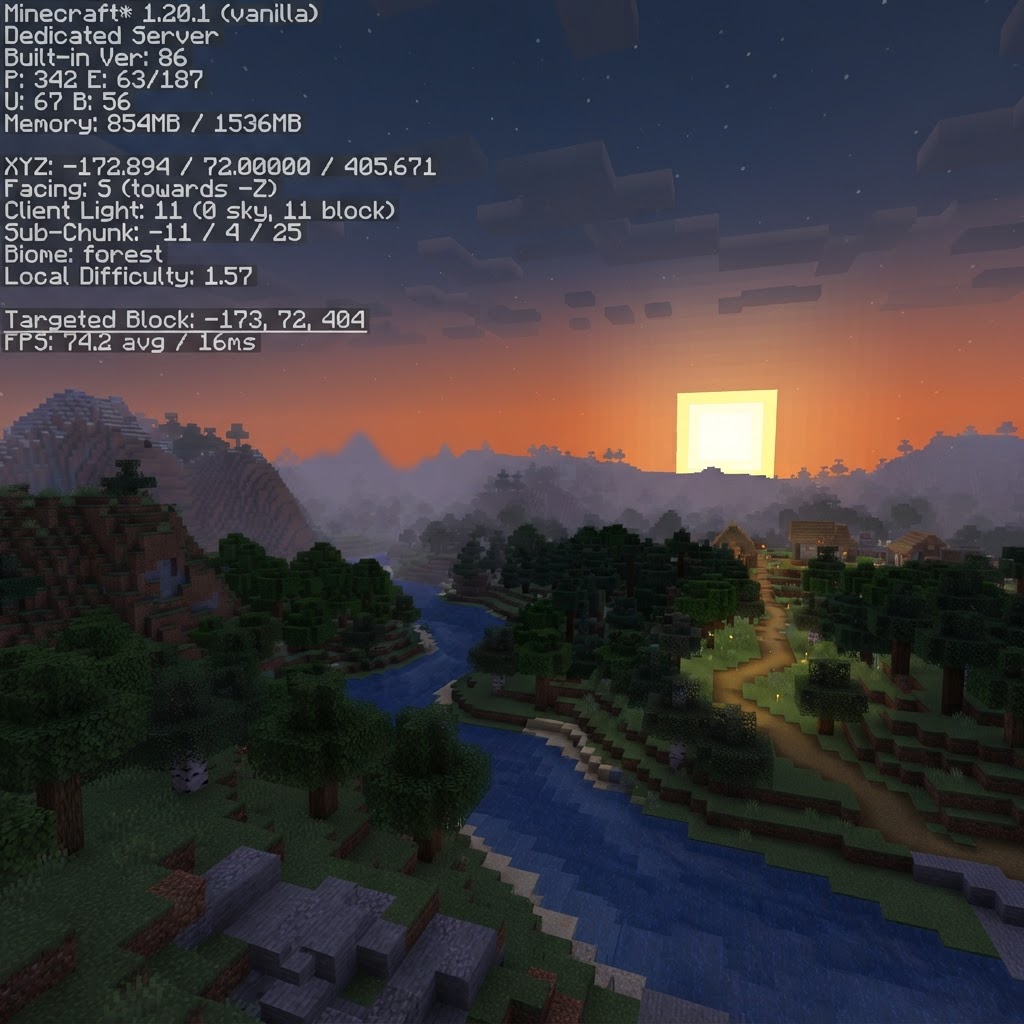
Minecraft 26.4 Snapshot 2 arrived on September 29, 2026, and it is a pure polish update. No new blocks, no new mobs, no gameplay changes. Instead, Mojang focused on two things players have complained about for years: the cluttered F3 debug screen and the jarring fog edge at the render distance limit. There is also a quiet fix for a sky rendering bug that has been in the game since the days of old lighting.
1. F3 Debug Screen Gets Headers and Grouped Sections
The F3 screen is one of the most-used tools in Java Edition. Coordinates, FPS, server info, chunk data, biome names, light levels. It all lives there, dumped onto your screen in a wall of text with no separation. Snapshot 2 changes that completely.
The debug screen now uses headers and grouped sections organized across both sides of the screen:
| Left Side | Right Side |
|---|---|
| FPS and refresh rate | Minecraft version number |
| Position (XYZ coordinates) | Memory usage |
| Server and packet information | Detailed performance section |
| Help section for debug controls | System specs (including Vulkan status) |
The most useful addition is the Vulkan status indicator on the right side. Since Snapshot 1 made Vulkan the default graphics API, you can now confirm at a glance whether your game is actually running Vulkan or fell back to OpenGL. The Help section at the bottom of the left panel also lists all F3 keybinds inline, so you no longer need to guess what F3 + G or F3 + I does.
2. Render Distance Fog Blends with Sky and Clouds
If you have Improved Transparency enabled in your video settings, the sky background and clouds behind terrain now blend into the render distance fog. Before this snapshot, there was a hard visual edge where the loaded world ended and the fog cutoff began. The world looked like it simply stopped existing at a fixed line.
With Snapshot 2, that hard edge softens. The sky and clouds fade smoothly into the fog color, creating a natural horizon effect. The change is most noticeable when you are standing on a high mountain or flying with an Elytra. The world no longer feels like it ends abruptly at the edge of your render distance.
3. Sky Occlusion: Sun and Moon No Longer Clip Through the Skybox
This is a fix for a bug that has existed in Minecraft for years. At low angles, especially near sunrise and sunset, the Sun and Moon could appear through the bottom half of the skybox. They would render below the horizon line in places where they should be occluded by the sky geometry. It was a minor visual inconsistency, but once you noticed it, it was hard to unsee.
Snapshot 2 introduces a dedicated sky occlusion shader. The bottom half of the skybox now properly covers the Sun and Moon at certain angles. Instead of a hard cutoff line, the shader fades the skybox into the current fog color at the border. This means the transition looks natural regardless of your fog settings or time of day.
Players running Improved Transparency will notice the fix most during sunrise and sunset, when the fog color shifts and the Sun sits near the horizon. The old clipping was especially visible during these moments because the warm fog color contrasted sharply with the Sun sprite poking through.
4. Technical Changes: Pack Versions Bumped
Snapshot 2 bumps the data pack version to 122.1 and the resource pack version to 99.0, up from 122.0 and 98.0 in Snapshot 1. The data version is now 5120. New shaders were also added as part of the sky occlusion system, which affects anyone writing custom shader packs.
If you run datapacks or resource packs, you will need to update your pack.mcmeta files to match these new version numbers. Packs designed for 26.3 or earlier will not load in Snapshot 2 without a version bump. Our datapacks at MineAddons Hub are already updated for 26.4 compatibility.
5. How to Install the Snapshot
To try 26.4 Snapshot 2, open the Minecraft Launcher, go to Installations, and enable experimental snapshots. Create a new installation with the latest snapshot build. As always, snapshots can corrupt worlds, so back up your saves or test in a fresh world.
Server operators can grab the cross-platform server JAR from the official Minecraft site. Make sure all datapacks and resource packs are updated to versions 122.1 and 99.0 respectively before launching.
Love the cleaner F3 screen but want coordinates without cluttering your whole display? Our free HUD+ datapack shows your coordinates, facing direction, and biome right on your HUD. No F3 needed.
Download HUD+ Coords Datapack (Free)Free vanilla datapack · works with Minecraft 1.21+ and 26.3/26.4 snapshots · no mods required